Shipped

Wavefront is an open-source middleware platform designed to seamlessly integrate AI-driven agents, workflows, and data sources across enterprise environments. It acts as a connective layer that bridges modular frontend applications with complex backend data pipelines.


This project focused on designing an interface that balanced scalability with simplicity. The result was a foundation that made AI system management intuitive, transparent, and ready for enterprise deployment.

Wavefront is an open-source middleware platform designed to seamlessly integrate AI-driven agents, workflows, and data sources across enterprise environments. It acts as a connective layer that bridges modular frontend applications with complex backend data pipelines.


This project focused on designing an interface that balanced scalability with simplicity. The result was a foundation that made AI system management intuitive, transparent, and ready for enterprise deployment.

Skills

Skills

Interface design, User experience design

Interface design, User experience design

Timeline

Timeline

2 weeks

2 weeks

Team

Team

Parvathy KuroorU1
Vishnu SatisU2
Vishnu RKU3
Nitin ShajiU4
Parvathy KuroorU1
Vishnu SatisU2
Vishnu RKU3
Nitin ShajiU4

CONTEXT

CONTEXT

CONTEXT

The goal was to design an internal builder and dashboard where teams could manage data sources, agents, models, and workflows - all in one place. The tool needed to be simple enough for non-technical users to navigate, yet powerful enough for developers to build complex connections between systems.


My role as the designer was to define the end-to-end interface UI, ensuring the interface felt modular, scalable, and intuitive for every type of user.

The goal was to design an internal builder and dashboard where teams could manage data sources, agents, models, and workflows - all in one place. The tool needed to be simple enough for non-technical users to navigate, yet powerful enough for developers to build complex connections between systems.


My role as the designer was to define the end-to-end interface UI, ensuring the interface felt modular, scalable, and intuitive for every type of user.

The goal was to design an internal builder and dashboard where teams could manage data sources, agents, models, and workflows - all in one place. The tool needed to be simple enough for non-technical users to navigate, yet powerful enough for developers to build complex connections between systems.


My role as the designer was to define the end-to-end interface UI, ensuring the interface felt modular, scalable, and intuitive for every type of user.

Wavefront architecture diagram

Wavefront architecture diagram

PROBLEM

PROBLEM

PROBLEM

Before the middleware tool, every AI project required separate setups, multiple dashboards, and manual configuration.
This led to:

  • Fragmented project management

  • Repetitive configuration work across teams

  • Difficulty tracking dependencies and workflow health


We needed to bring everything together into one clear, visual management system that could scale as Rootflo’s AI ecosystem expanded.

Before the middleware tool, every AI project required separate setups, multiple dashboards, and manual configuration.
This led to:

  • Fragmented project management

  • Repetitive configuration work across teams

  • Difficulty tracking dependencies and workflow health


We needed to bring everything together into one clear, visual management system that could scale as Rootflo’s AI ecosystem expanded.

Before the middleware tool, every AI project required separate setups, multiple dashboards, and manual configuration.
This led to:

  • Fragmented project management

  • Repetitive configuration work across teams

  • Difficulty tracking dependencies and workflow health


We needed to bring everything together into one clear, visual management system that could scale as Rootflo’s AI ecosystem expanded.

DESIGN OBJECTIVES

DESIGN OBJECTIVES

DESIGN OBJECTIVES

Create a unified workspace for all AI applications

Create a unified workspace for all AI applications

⚙️

Simplify the setup and configuration process

Simplify the setup and configuration process

👀

Enable visibility across projects, workflows and data sources

Enable visibility across projects, workflows and data sources

🧩

Design for modularity — every part of the system should feel connected but independent

Design for modularity — every part of the system should feel connected but independent

NAVIGATION AND INFORMATION HIERARCHY

NAVIGATION AND INFORMATION HIERARCHY

NAVIGATION AND INFORMATION HIERARCHY

To maintain a clear flow, navigation was split into two levels:

  • Global navigation - Home page with the existing projects and button to create new application

  • Sub navigation - Inside the create application tool with data sources, agents, models and the workflows to tie everything together

To maintain a clear flow, navigation was split into two levels:

  • Global navigation - Home page with the existing projects and button to create new application

  • Sub navigation - Inside the create application tool with data sources, agents, models and the workflows to tie everything together

VISUAL DESIGN AND TONE

VISUAL DESIGN AND TONE

VISUAL DESIGN AND TONE

Logo design

Logo design

Logo design

The logo required to be simple but memorable. The design captures both movement (wave) and structure (blocks), which is the story of Wavefront: an elegant, living layer that’s also modular and composable.

The logo required to be simple but memorable. The design captures both movement (wave) and structure (blocks), which is the story of Wavefront: an elegant, living layer that’s also modular and composable.

Typography

Typography

Typography

We needed a font with clean geometry and high legibility, allowing the interface to feel modern yet professional.

We needed a font with clean geometry and high legibility, allowing the interface to feel modern yet professional.

Microcopy

Microcopy

Microcopy

Simple, encouraging phrases like “Let’s start your journey” to make the platform feel approachable.

Simple, encouraging phrases like “Let’s start your journey” to make the platform feel approachable.

#101010

#FFFFFF

#FBFBFB

#CED1D6

Colour

Colour

Colour

A blend of white and soft gradients, maintaining light mode across platforms.

A blend of white and soft gradients, maintaining light mode across platforms.

UI style

UI style

UI style

Follows a minimal style that prioritizes clarity and focus. Neutral tones and structured layouts make complex workflows feel approachable while maintaining a sense of technical precision.

Follows a minimal style that prioritizes clarity and focus. Neutral tones and structured layouts make complex workflows feel approachable while maintaining a sense of technical precision.

INTERFACE DESIGN

INTERFACE DESIGN

INTERFACE DESIGN

App management dashboard

App management dashboard

App management dashboard

The first layer was the App Management Dashboard, the home screen for every user. It provided a simple overview of all applications within the ecosystem.


The dashboard featured:

  • A "Create new application" card for easy onboarding

  • Individual application tiles showing project names, links, and last updated timestamps

  • A calm gradient background that subtly differentiated this layer from the workspace, giving it a sense of clarity and freshness

The first layer was the App Management Dashboard, the home screen for every user. It provided a simple overview of all applications within the ecosystem.


The dashboard featured:

  • A "Create new application" card for easy onboarding

  • Individual application tiles showing project names, links, and last updated timestamps

  • A calm gradient background that subtly differentiated this layer from the workspace, giving it a sense of clarity and freshness

Modular workspace

Modular workspace

Modular workspace

The interface was structured as a workspace - a flexible environment where users could create and manage different types of components

The interface was structured as a workspace - a flexible environment where users could create and manage different types of components

App creation

The "Create new app" popup keeps the form minimal and non-intimidating, focusing only on essential fields like app name, key, secret, and URL.


Each input field is paired with helper text for guidance, ensuring technical clarity without overwhelming the user.

The "Create new app" popup keeps the form minimal and non-intimidating, focusing only on essential fields like app name, key, secret, and URL. Each input field is paired with helper text for guidance, ensuring technical clarity without overwhelming the user.

The "Create new app" popup keeps the form minimal and non-intimidating, focusing only on essential fields like app name, key, secret, and URL. Each input field is paired with helper text for guidance, ensuring technical clarity without overwhelming the user.

Home page for a new app

Once a new application is created, users land on an empty state that sets the tone for their workspace.


The layout uses a friendly onboarding message - “Let’s start your journey” - paired with modular cards prompting the user to create their first database, agent, or workflow.

Once a new application is created, users land on an empty state that sets the tone for their workspace.

The layout uses a friendly onboarding message - “Let’s start your journey” - paired with modular cards prompting the user to create their first database, agent, or workflow.

Once a new application is created, users land on an empty state that sets the tone for their workspace.

The layout uses a friendly onboarding message - “Let’s start your journey” - paired with modular cards prompting the user to create their first database, agent, or workflow.

Empty state for tabs

For each tab such as data sources, agents, or workflows, the empty state maintains a consistent structure. When no items exist, users see a minimal illustration and message that says “No *component* found,” followed by a single clear button to create one.


This consistent approach reinforces predictability across modules.

For each tab such as data sources, agents, or workflows, the empty state maintains a consistent structure. When no items exist, users see a minimal illustration and message that says “No *component* found,” followed by a single clear button to create one. This consistent approach reinforces predictability across modules.

For each tab such as data sources, agents, or workflows, the empty state maintains a consistent structure. When no items exist, users see a minimal illustration and message that says “No *component* found,” followed by a single clear button to create one. This consistent approach reinforces predictability across modules.

Creating a new component

When the user initiates a creation flow like adding a data source, the interface expands into a focused configuration screen.


Form fields are organized into logical sections - general details, optional description, and connection configuration.

When the user initiates a creation flow like adding a data source, the interface expands into a focused configuration screen. Form fields are organized into logical sections - general details, optional description, and connection configuration.

When the user initiates a creation flow like adding a data source, the interface expands into a focused configuration screen. Form fields are organized into logical sections - general details, optional description, and connection configuration.

Created components listing

Once components are added, the empty state transitions into a structured grid layout. Each card displays key identifiers like name, ID, and namespace, keeping information clear and consistent.


A prominent “Create new” button remains visible for quick addition. The grid layout provides an at-a-glance summary while maintaining balance as more components are added.

Once components are added, the empty state transitions into a structured grid layout. Each card displays key identifiers like name, ID, and namespace, keeping information clear and consistent. A prominent “Create new” button remains visible for quick addition. The grid layout provides an at-a-glance summary while maintaining balance as more components are added.

Once components are added, the empty state transitions into a structured grid layout. Each card displays key identifiers like name, ID, and namespace, keeping information clear and consistent. A prominent “Create new” button remains visible for quick addition. The grid layout provides an at-a-glance summary while maintaining balance as more components are added.

Details of a component

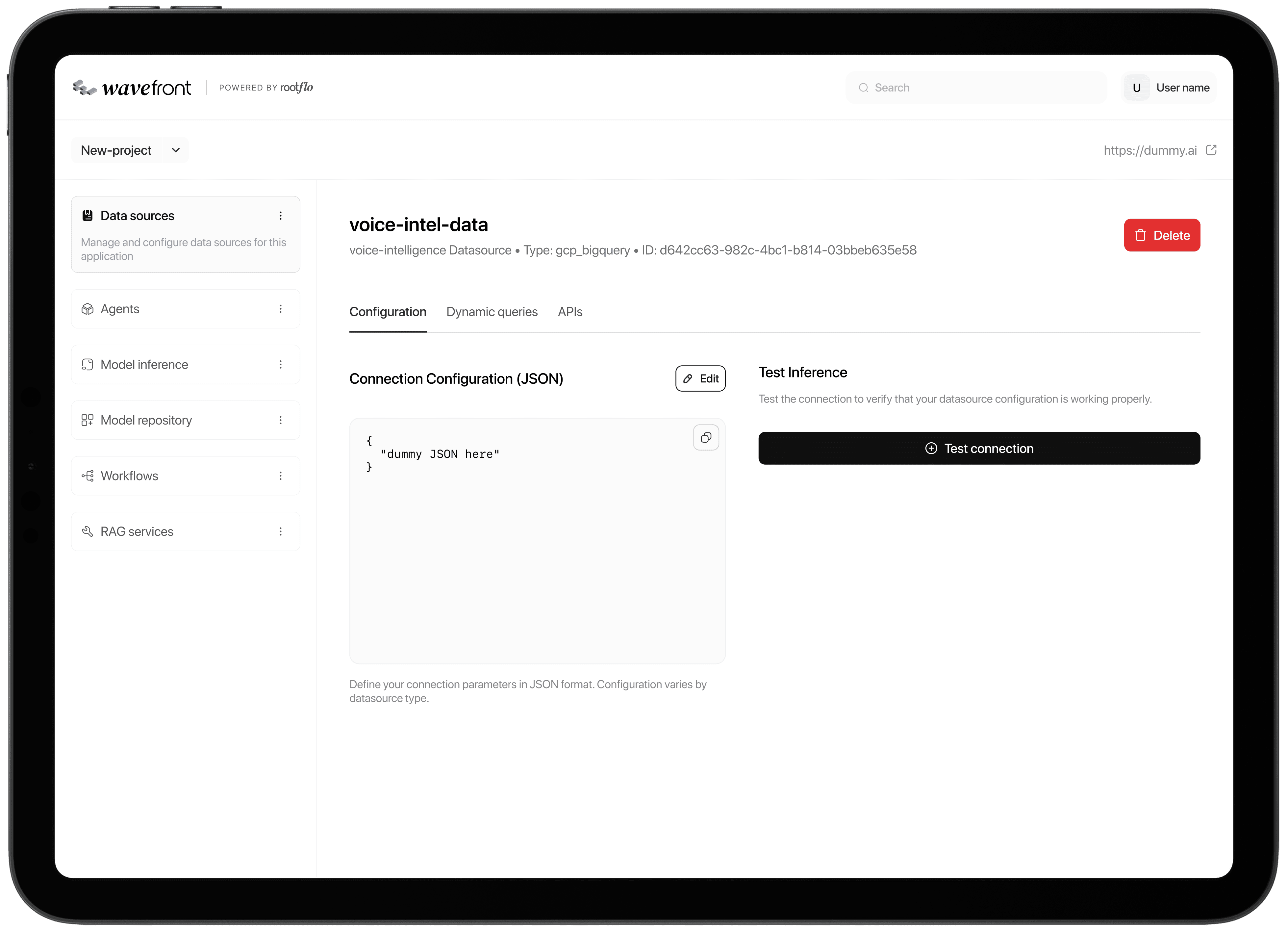
When the user opens a specific component such as a datasource, they enter a detailed view organized into tabs - configuration, dynamic queries, and APIs. This layout separates different functions without overwhelming the screen.


The tabbed structure ensures that each aspect of the agent - setup, data handling, and integration - is accessible without clutter, resulting in a clean and efficient workspace.

When the user opens a specific component such as a datasource, they enter a detailed view organized into tabs - configuration, dynamic queries, and APIs. This layout separates different functions without overwhelming the screen. The tabbed structure ensures that each aspect of the agent - setup, data handling, and integration - is accessible without clutter, resulting in a clean and efficient workspace.

When the user opens a specific component such as a datasource, they enter a detailed view organized into tabs - configuration, dynamic queries, and APIs. This layout separates different functions without overwhelming the screen. The tabbed structure ensures that each aspect of the agent - setup, data handling, and integration - is accessible without clutter, resulting in a clean and efficient workspace.

LEARNINGS

LEARNINGS

Designing internal tools taught me that every little detail needs a purpose. Working on the middleware platform meant building for totally different kinds of people - developers, data teams, and business folks - all using the same system in their own way.

I learned how to make screens that go deep technically without feeling overwhelming, and how modular design can keep even complicated workflows flexible as they grow. But the biggest lesson? Clarity beats fancy visuals. The best design choices were the ones that made someone’s day easier, faster, and so smooth they barely noticed the tool at all.

Designing internal tools taught me that every little detail needs a purpose. Working on the middleware platform meant building for totally different kinds of people - developers, data teams, and business folks - all using the same system in their own way.

I learned how to make screens that go deep technically without feeling overwhelming, and how modular design can keep even complicated workflows flexible as they grow. But the biggest lesson? Clarity beats fancy visuals. The best design choices were the ones that made someone’s day easier, faster, and so smooth they barely noticed the tool at all.

Designing internal tools taught me that every little detail needs a purpose. Working on the middleware platform meant building for totally different kinds of people - developers, data teams, and business folks - all using the same system in their own way.

I learned how to make screens that go deep technically without feeling overwhelming, and how modular design can keep even complicated workflows flexible as they grow. But the biggest lesson? Clarity beats fancy visuals. The best design choices were the ones that made someone’s day easier, faster, and so smooth they barely noticed the tool at all.

Let's work together

Let's work together

Let's work together

I'm eager to know more about your work, let's talk.

I'm eager to know more about your work, let's talk.

I'm eager to know more about your work, let's talk.

© 2025 Parvathy Kuroor

© 2025 Parvathy Kuroor

© 2025 Parvathy Kuroor

Back to top

Back to top

Back to top